Connect a real practice broker — your keys never touch a website.
The Floor can mirror a real paper account at a real broker — real market, fake money. And here's the part that makes us different: you never type your API keys into any website, ours included. They live in one private file on your own computer. Ten minutes, zero cost, and nothing on this page can spend a real cent.
Stocks, ETFs and crypto on a free paper account with a fake $100k. This one guide covers it all.
Support is built but parked (the testnet isn't reachable from the US). Crypto practice trading already works through Alpaca.
The deepest market access (options, futures). On the build list — nothing for you to do yet.
The three questions everyone asks
"What even is an API key?"
Think of it as a valet key for a brokerage account. A valet key starts the car but won't open the trunk — an API key lets a program check balances and place trades in one specific account, and nothing else. It can't log into your bank, can't see your other accounts, can't change your password. You create it with one click, and you can destroy it with one click.
"Can this touch my real money?"
No — and not because we promise to be careful, but because of how it's built. Two separate locks: the key you'll create only opens a paper account (fake $100k, no real funds in it, ever), and The Floor's broker connector is hard-coded to refuse any server except Alpaca's paper sandbox. That refusal is in the code itself — there is no code path to the live-money server, so there's no setting to get wrong.
"What if I mess up?"
Nothing here is permanent. Worst case, you revoke the key on Alpaca's website — one click, and it's dead everywhere, instantly, no matter who has it. Then delete one file from your computer and it's as if none of this ever happened. You can undo the entire guide in under a minute.
Get your Alpaca paper keys
Create a free account
Go to alpaca.markets and sign up. You don't need to fund anything or pass a brokerage application to get paper keys — those are issued the moment you verify your email.
Switch to Paper Trading
Inside the Alpaca dashboard, toggle from Live to Paper Trading (top-left account switcher). Everything you generate from here is sandboxed — a fake $100k account that behaves like the real market.
Account
Paper TradingGenerate your API keys
Go to Home → API Keys → Generate New Key (while still in Paper Trading mode). Alpaca shows the secret exactly once — copy both the key and secret somewhere safe before closing the dialog.
Shown once. If you lose it, revoke and generate a new pair — free, instant, no limit.
Put the keys on your machine — one file
Create one small text file
Your keys live in a plain text file called broker.env, inside a folder called .floor in your home folder. Three lines — you type your key and secret into the file, and nothing else ever needs them again:
Then lock it so only you can read it — one command in Terminal:
Not comfortable making the file yourself? If you set up Claude Code on the setup page, just type /floor-broker in it. It walks you through creating this exact file — and it's trained to have you type the keys into the file, never into the chat. If you ever paste a key into any chat by accident, it will stop and tell you to regenerate the key at Alpaca (which takes one click and makes the pasted one worthless).
Verify it, trade on paper, see it on your desk
Prove the connection works
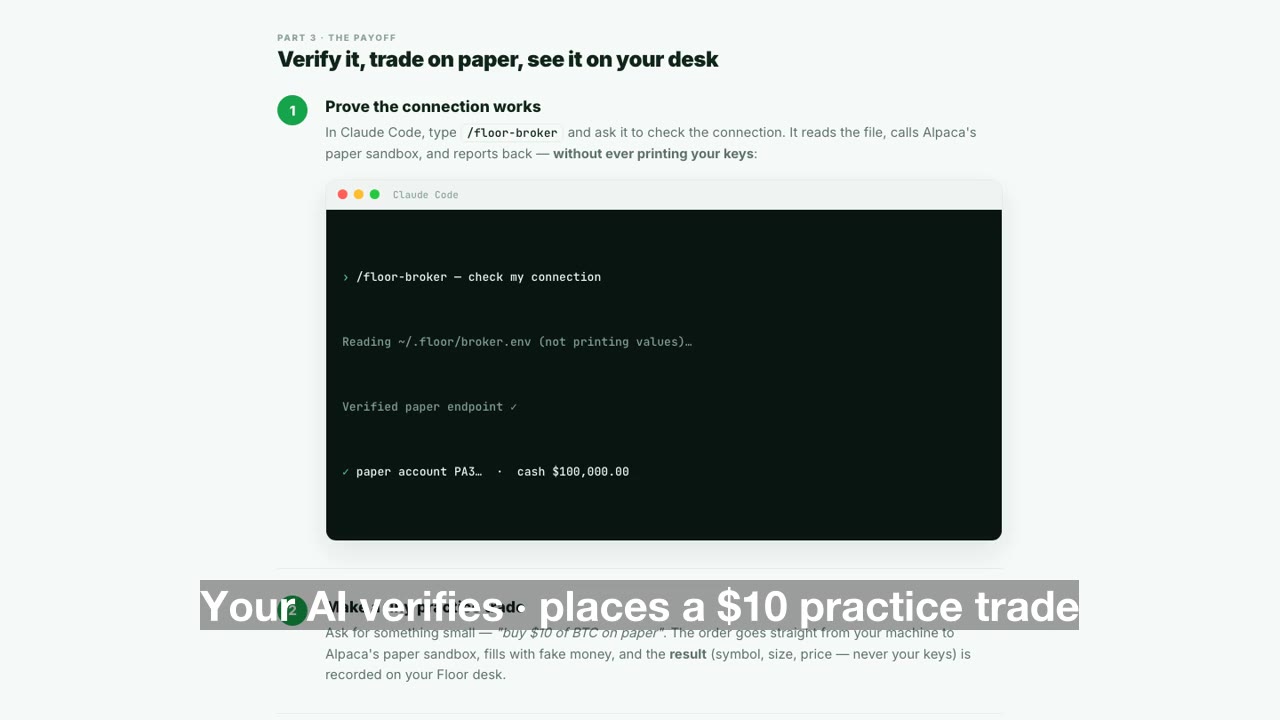
In Claude Code, type /floor-broker and ask it to check the connection. It reads the file, calls Alpaca's paper sandbox, and reports back — without ever printing your keys:
Make a tiny practice trade
Ask for something small — "buy $10 of BTC on paper". The order goes straight from your machine to Alpaca's paper sandbox, fills with fake money, and the result (symbol, size, price — never your keys) is recorded on your Floor desk.
See it on The Floor
Open The Floor → Trades. Your paper fill is there, feeding your portfolio, strategies and reports. That's the whole loop: keys on your machine, trades at the broker's sandbox, results on your desk. The Floor's servers never see a key at any point.
Quick answers
Why doesn't The Floor just have a box to paste keys, like other platforms?
Deliberately. Keys pasted into websites are exactly how people get burned — a leaked database or a phishing page and the key is gone. A file on your computer can't be phished by a website, ours included. The safest key box is the one that doesn't exist.
I already pasted my key somewhere I shouldn't have. What now?
Go to Alpaca → Home → API Keys → Regenerate. The old key dies instantly, everywhere, and you get a fresh pair. Update the one file and you're clean again. This is always the fix — regeneration is free and unlimited.
Do I need Binance or IBKR to get started?
No. Alpaca's paper account alone covers stocks, ETFs and crypto practice trading today. Binance Testnet support is built but on hold (its sandbox isn't reachable from the US); IBKR is on the roadmap. When they ship, they'll follow this same keys-stay-home pattern.
How do I undo all of this?
Two steps, under a minute: regenerate (or delete) the key at Alpaca, and delete ~/.floor/broker.env from your computer. Done — nothing left anywhere.
← AI setup guide · Back to The Floor · Questions? Get in touch